メインコンテンツへスキップ
Weave は、weave.init() が呼び出された後に、ChatNVIDIA ライブラリ経由で行われた LLM 呼び出しを自動的にトレースしてログに記録します。
最新のチュートリアルについては、Weights & Biases on NVIDIA を参照してください。

トレース

LLM アプリケーションのトレースを、開発中および本番環境のどちらでも中央のデータベースに保存しておくことは重要です。これらのトレースはデバッグに利用できるほか、アプリケーションを改善する際に評価用として使う難しい例のデータセットを構築するのにも役立ちます。
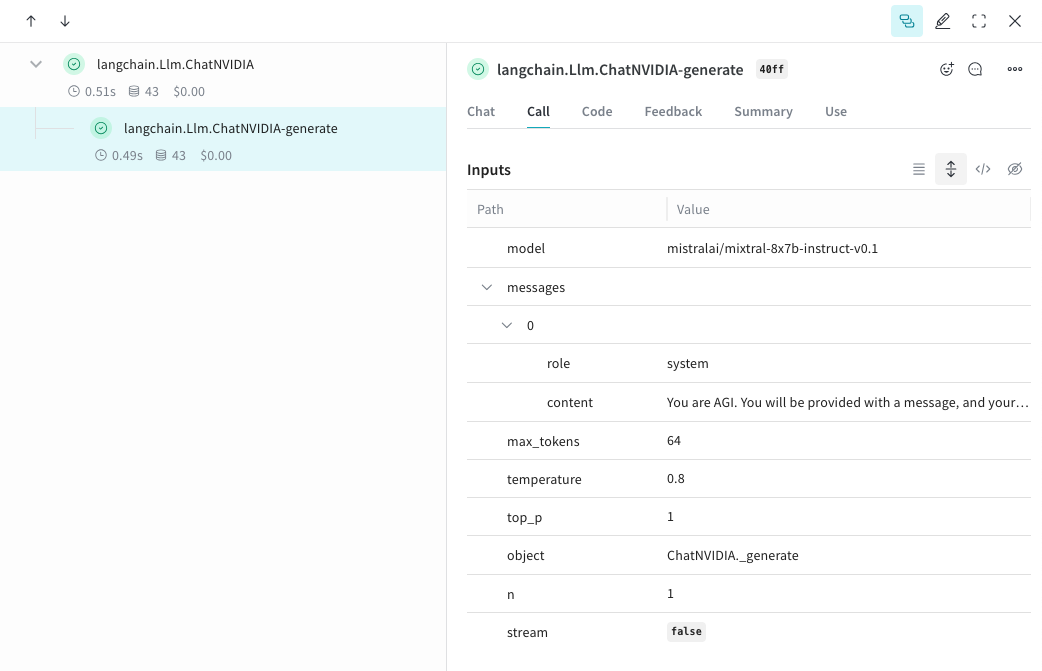
Weave は ChatNVIDIA Python ライブラリ のトレースを自動的に取得できます。任意のプロジェクト名を指定して weave.init(<project-name>) を呼び出し、トレースの取得を開始します。
from langchain_nvidia_ai_endpoints import ChatNVIDIA
import weave
client = ChatNVIDIA(model="mistralai/mixtral-8x7b-instruct-v0.1", temperature=0.8, max_tokens=64, top_p=1)
weave.init('emoji-bot')

messages=[
    {
      "role": "system",
      "content": "You are AGI. You will be provided with a message, and your task is to respond using emojis only."
    }]

response = client.invoke(messages)
chatnvidia_trace.png

自分の op をトラッキングする

関数を @weave.op でラップすると、入力、出力、アプリのロジックがキャプチャされるようになり、データがアプリ内をどのように流れているかをデバッグできるようになります。op は深くネストでき、トラッキングしたい関数のツリーを構築できます。また、実験しながら、git にコミットしていないアドホックな詳細も含めてコードが自動的にバージョン管理されます。@weave.op でデコレートし、ChatNVIDIA python library を呼び出す関数を作成するだけです。次の例では、2 つの関数を op でラップしています。これにより、RAG アプリにおけるリトリーバルステップのような中間ステップが、アプリの挙動にどのように影響しているかを確認できます。
import weave
from langchain_nvidia_ai_endpoints import ChatNVIDIA
import requests, random
PROMPT="""Emulate the Pokedex from early Pokémon episodes. State the name of the Pokemon and then describe it.
        Your tone is informative yet sassy, blending factual details with a touch of dry humor. Be concise, no more than 3 sentences. """
POKEMON = ['pikachu', 'charmander', 'squirtle', 'bulbasaur', 'jigglypuff', 'meowth', 'eevee']
client = ChatNVIDIA(model="mistralai/mixtral-8x7b-instruct-v0.1", temperature=0.7, max_tokens=100, top_p=1)

@weave.op
def get_pokemon_data(pokemon_name):
    # これはアプリケーション内の 1 ステップで、RAG アプリ内のリトリーバルステップのようなものです
    url = f"https://pokeapi.co/api/v2/pokemon/{pokemon_name}"
    response = requests.get(url)
    if response.status_code == 200:
        data = response.json()
        name = data["name"]
        types = [t["type"]["name"] for t in data["types"]]
        species_url = data["species"]["url"]
        species_response = requests.get(species_url)
        evolved_from = "Unknown"
        if species_response.status_code == 200:
            species_data = species_response.json()
            if species_data["evolves_from_species"]:
                evolved_from = species_data["evolves_from_species"]["name"]
        return {"name": name, "types": types, "evolved_from": evolved_from}
    else:
        return None

@weave.op
def pokedex(name: str, prompt: str) -> str:
    # これは他の op を呼び出すルート op です
    data = get_pokemon_data(name)
    if not data: return "Error: Unable to fetch data"

    messages=[
            {"role": "system","content": prompt},
            {"role": "user", "content": str(data)}
        ]

    response = client.invoke(messages)
    return response.content

weave.init('pokedex-nvidia')
# 特定のポケモンのデータを取得する
pokemon_data = pokedex(random.choice(POKEMON), PROMPT)
Weave を開き、UI で get_pokemon_data をクリックすると、そのステップの入力と出力を確認できます。
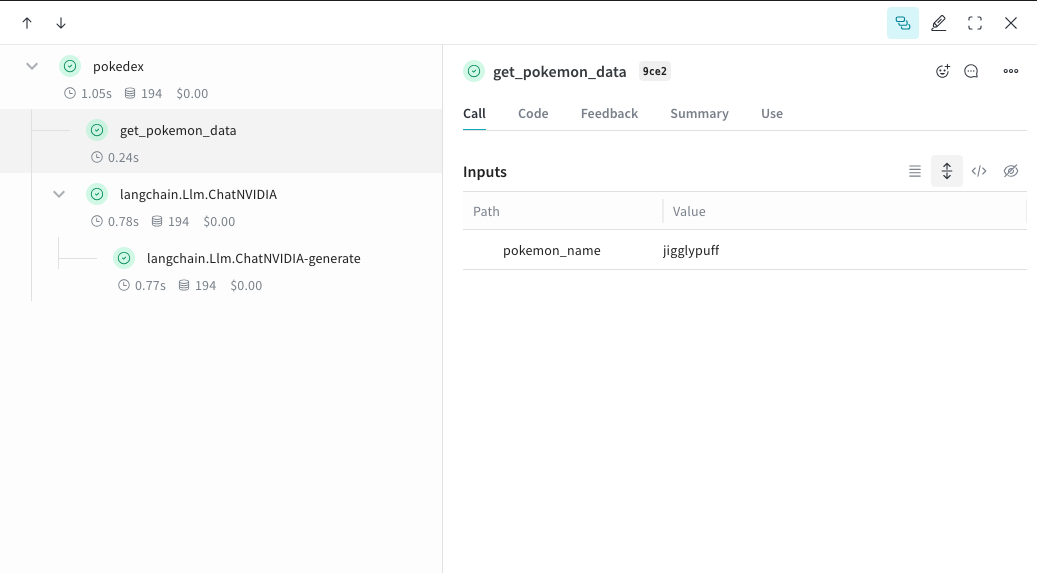
nvidia_pokedex.png

実験をより簡単にするために Model を作成する

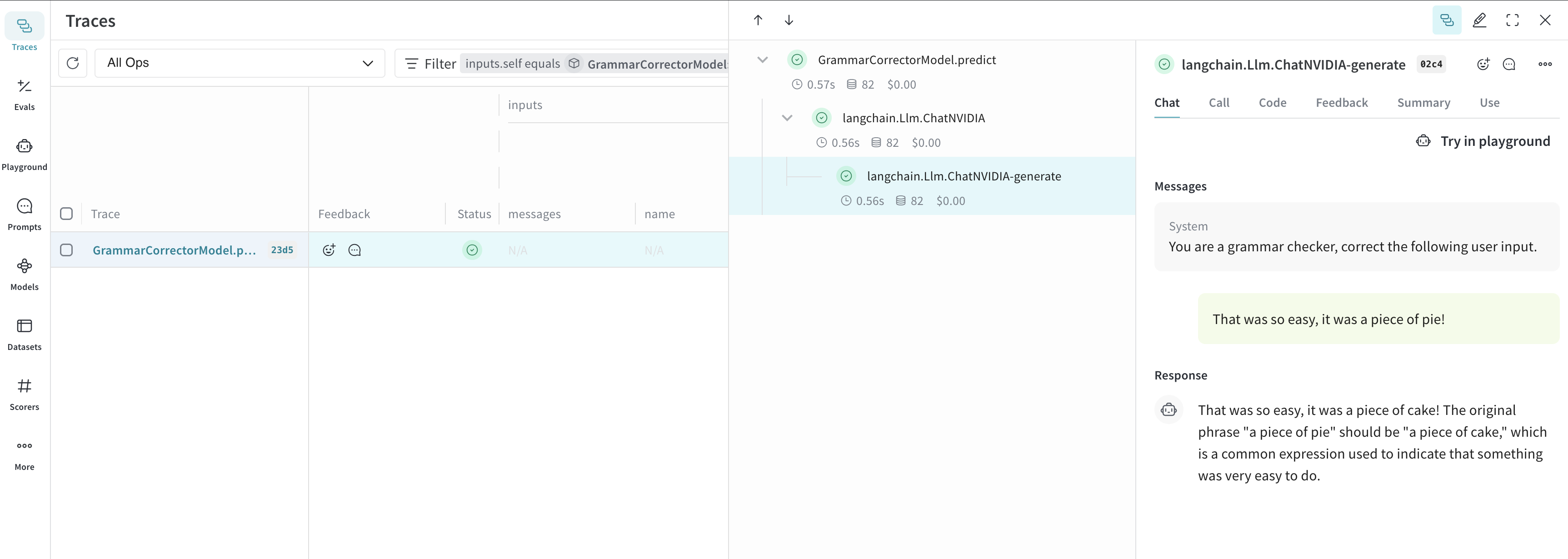
多くの要素が関わっていると、実験を整理するのは難しくなります。Model クラスを使うと、システムプロンプトや使用しているモデルなど、アプリの実験に関する詳細を記録して整理できます。これにより、アプリのさまざまな反復バージョンを整理して比較しやすくなります。コードのバージョニングと入出力の記録に加えて、Model はアプリケーションの挙動を制御する構造化されたパラメータも記録するため、どのパラメータが最もうまく機能したかを簡単に見つけられます。Weave の Model は、serveEvaluation と組み合わせて使うこともできます。以下の例では、modelsystem_message を変更して試すことができます。これらのいずれかを変更するたびに、GrammarCorrectorModel の新しい バージョン が作成されます。
import weave
from langchain_nvidia_ai_endpoints import ChatNVIDIA

weave.init('grammar-nvidia')

class GrammarCorrectorModel(weave.Model): # `weave.Model` に変更
  system_message: str

  @weave.op()
  def predict(self, user_input): # `predict` に変更
    client = ChatNVIDIA(model="mistralai/mixtral-8x7b-instruct-v0.1", temperature=0, max_tokens=100, top_p=1)

    messages=[
          {
              "role": "system",
              "content": self.system_message
          },
          {
              "role": "user",
              "content": user_input
          }
          ]

    response = client.invoke(messages)
    return response.content

corrector = GrammarCorrectorModel(
    system_message = "あなたは文法チェッカーです。次のユーザー入力を修正してください。")
result = corrector.predict("That was so easy, it was a piece of pie!")
print(result)
chatnvidia_model.png

使用方法

ChatNVIDIA インテグレーションは、invokestream およびそれらの非同期版をサポートします。ツールの利用にも対応しています。 ChatNVIDIA はさまざまな種類のモデルでの利用を想定しているため、function calling には対応していません。