メインコンテンツへスキップ
Track LLM inputs & outputs チュートリアルでは、LLM の入力と出力をトラッキングする基本について説明しました。 このチュートリアルでは、次のことを学びます。
  • アプリケーション内を流れる データをトラッキング する
  • 呼び出し時に メタデータをトラッキング する

ネストした関数呼び出しのトラッキング

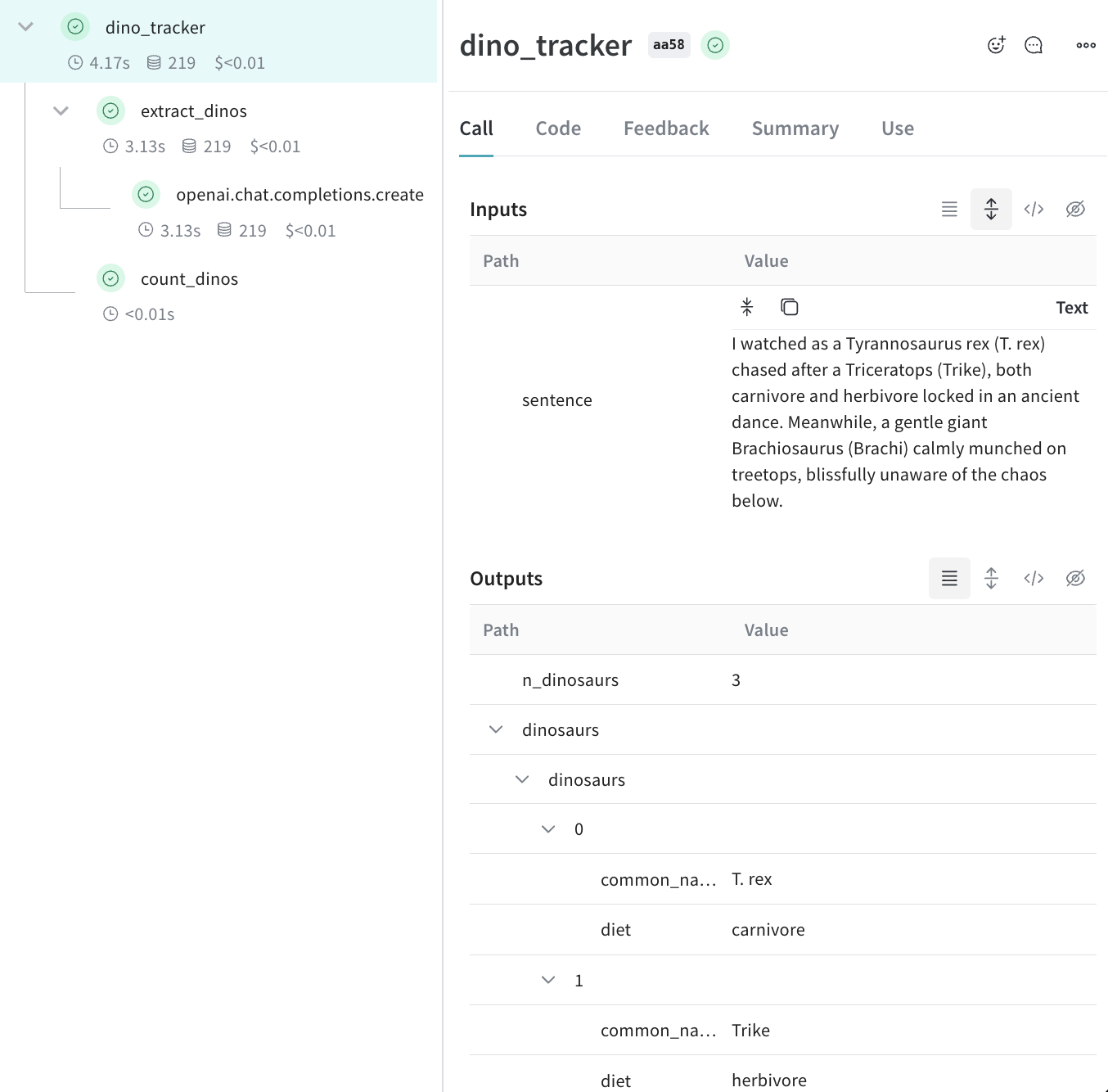
LLM を利用したアプリケーションには、複数の LLM 呼び出しに加えて、監視対象として重要な追加のデータ処理や検証ロジックが含まれる場合があります。多くのアプリで一般的な深いネスト構造であっても、追跡したいすべての関数に weave.op() を追加しておけば、Weave はネストした関数における親子関係を追跡し続けます。 クイックスタートの例 を発展させて、次のコードでは LLM から返されたアイテム数をカウントし、それらすべてをより高レベルな関数でラップする追加ロジックを加えています。さらに、この例では weave.op() を使用して、すべての関数、その呼び出し順序、および親子関係をトレースしています。
import weave
import json
from openai import OpenAI

client = OpenAI()

@weave.op()
def extract_dinos(sentence: str) -> dict:
    response = client.chat.completions.create(
        model="gpt-4o",
        messages=[
            {
                "role": "system",
                "content": """Extract any dinosaur `name`, their `common_name`, \
names and whether its `diet` is a herbivore or carnivore, in JSON format."""
            },
            {
                "role": "user",
                "content": sentence
            }
            ],
            response_format={ "type": "json_object" }
        )
    return response.choices[0].message.content

@weave.op()
def count_dinos(dino_data: dict) -> int:
    # 返されたリスト内のアイテム数を数える
    k = list(dino_data.keys())[0]
    return len(dino_data[k])

@weave.op()
def dino_tracker(sentence: str) -> dict:
    # LLM を使って恐竜を抽出する
    dino_data = extract_dinos(sentence)

    # 返された恐竜の数を数える
    dino_data = json.loads(dino_data)
    n_dinos = count_dinos(dino_data)
    return {"n_dinosaurs": n_dinos, "dinosaurs": dino_data}

weave.init('jurassic-park')

sentence = """I watched as a Tyrannosaurus rex (T. rex) chased after a Triceratops (Trike), \
both carnivore and herbivore locked in an ancient dance. Meanwhile, a gentle giant \
Brachiosaurus (Brachi) calmly munched on treetops, blissfully unaware of the chaos below."""

result = dino_tracker(sentence)
print(result)
ネストされた関数上記のコードを実行すると、2つのネストされた関数(extract_dinoscount_dinos)の入力と出力に加えて、自動的にログされる OpenAI のトレースを確認できます。ネストされた Weave トレース
メタデータの追跡

weave.attributes コンテキストマネージャーを使用し、追跡したいメタデータを辞書として実行時に渡すことでメタデータを追跡できます。 先ほどの例の続きです:
import weave

weave.init('jurassic-park')

sentence = """I watched as a Tyrannosaurus rex (T. rex) chased after a Triceratops (Trike), \
both carnivore and herbivore locked in an ancient dance. Meanwhile, a gentle giant \
Brachiosaurus (Brachi) calmly munched on treetops, blissfully unaware of the chaos below."""

# 先ほど定義した関数とあわせてメタデータを追跡する
with weave.attributes({'user_id': 'lukas', 'env': 'production'}):
    result = dino_tracker(sentence)
ユーザー ID やコードの実行環境(development、staging、production など)のようなメタデータは、実行時に追跡することを推奨します。システムプロンプトのようなシステム設定を追跡するには、Weave Models の利用を推奨します。

次のステップ

  • アドホックなプロンプト、モデル、アプリケーションの変更を記録し、バージョン管理し、整理するには、App Versioning チュートリアル に従ってください。