メインコンテンツへスキップ
これはインタラクティブなノートブックです。ローカルで実行するか、以下のリンクから開くこともできます:

前提条件

開始する前に、必要なライブラリをインストールしてインポートし、W&BのAPIキーを取得して、Weave プロジェクトを初期化します。
# 必要な依存関係をインストールする
!pip install openai weave -q
python
import json
import os

from google.colab import userdata
from openai import OpenAI

import weave
python
# APIキーを取得する
os.environ["OPENAI_API_KEY"] = userdata.get(
    "OPENAI_API_KEY"
)  # 左側のメニューからColabの環境シークレットとしてキーを設定してください
os.environ["WANDB_API_KEY"] = userdata.get("WANDB_API_KEY")

# プロジェクト名を設定する
# PROJECT の値を自分のプロジェクト名に置き換えてください
PROJECT = "vlm-handwritten-ner"

# Weave プロジェクトを初期化する
weave.init(PROJECT)

1. Weave を使ってプロンプトを作成し、反復的に改善する

適切なプロンプトエンジニアリングは、モデルが Entities を正しく抽出できるように導くうえで非常に重要です。まず、画像データから何を抽出し、どのような形式で出力するかをモデルに指示する基本的なプロンプトを作成します。次に、そのプロンプトを Weave に保存し、トラッキングしながら反復的に改善していきます。
# Weaveでプロンプトオブジェクトを作成する
prompt = """
Extract all readable text from this image. Format the extracted entities as a valid JSON.
Do not return any extra text, just the JSON. Do not include ```json```
Use the following format:
{"Patient Name": "James James","Date": "4/22/2025","Patient ID": "ZZZZZZZ123","Group Number": "3452542525"}
"""
system_prompt = weave.StringPrompt(prompt)
# プロンプトをWeaveに公開する
weave.publish(system_prompt, name="NER-prompt")
次に、出力エラーを減らすために、プロンプトにさらなる指示と検証ルールを追加して改善します。
better_prompt = """
You are a precision OCR assistant. Given an image of patient information, extract exactly these fields into a single JSON object—and nothing else:

- Patient Name
- Date (MM/DD/YYYY)
- Patient ID
- Group Number

Validation rules:
1. Date must match MM/DD/YY; if not, set Date to "".
2. Patient ID must be alphanumeric; if unreadable, set to "".
3. Always zero-pad months and days (e.g. "04/07/25").
4. Omit any markup, commentary, or code fences.
5. Return strictly valid JSON with only those four keys.

Do not return any extra text, just the JSON. Do not include ```json```
Example output:
{"Patient Name":"James James","Date":"04/22/25","Patient ID":"ZZZZZZZ123","Group Number":"3452542525"}
"""
# プロンプトを編集する
system_prompt = weave.StringPrompt(better_prompt)
# 編集したプロンプトをWeaveに公開する
weave.publish(system_prompt, name="NER-prompt")

2. データセットを取得する

次に、OCR パイプラインの入力として使用する手書きメモのデータセットを取得します。 データセット内の画像はすでに base64 でエンコードされているため、LLM は事前処理なしにそのままこのデータを利用できます。
# 以下のWeaveプロジェクトからデータセットを取得する
dataset = weave.ref(
    "weave://wandb-smle/vlm-handwritten-ner/object/NER-eval-dataset:G8MEkqWBtvIxPYAY23sXLvqp8JKZ37Cj0PgcG19dGjw"
).get()

# データセット内の特定のサンプルにアクセスする
example_image = dataset.rows[3]["image_base64"]

# example_imageを表示する
from IPython.display import HTML, display

html = f'<img src="{example_image}" style="max-width: 100%; height: auto;">'
display(HTML(html))

3. NER パイプラインを構築する

次に、NER パイプラインを構築します。パイプラインは次の 2 つの関数で構成されます。
  1. データセットから受け取った PIL 画像を、VLM に渡すことができる base64 形式の文字列表現に変換して返す encode_image 関数
  2. 画像とシステムプロンプトを受け取り、そのシステムプロンプトで指示されたとおりに画像から抽出された固有表現を返す extract_named_entities_from_image 関数
# GPT-4-Visionを使用したトレース可能な関数
def extract_named_entities_from_image(image_base64) -> dict:
    # LLMクライアントの初期化
    client = OpenAI()

    # 指示プロンプトの設定
    # Weaveに保存されたプロンプトをweave.ref("weave://wandb-smle/vlm-handwritten-ner/object/NER-prompt:FmCv4xS3RFU21wmNHsIYUFal3cxjtAkegz2ylM25iB8").get().content.strip()で使用することも可能です
    prompt = better_prompt

    response = client.responses.create(
        model="gpt-4.1",
        input=[
            {
                "role": "user",
                "content": [
                    {"type": "input_text", "text": prompt},
                    {
                        "type": "input_image",
                        "image_url": image_base64,
                    },
                ],
            }
        ],
    )

    return response.output_text
ここで、次のことを行う named_entity_recognation という関数を作成します:
  • 画像データを NER パイプラインに渡す
  • 結果を正しくフォーマットされた JSON で返す
W&B UI 上で関数の実行を自動的にトラッキングおよびトレースするために、@weave.op() decorator デコレーターを使用します。 named_entity_recognation が実行されるたびに、すべてのトレース結果が Weave UI で確認できます。トレースを表示するには、Weave プロジェクトの Traces タブに移動します。
# 評価用NER関数
@weave.op()
def named_entity_recognation(image_base64, id):
    result = {}
    try:
        # 1) vision opを呼び出し、JSON文字列を取得する
        output_text = extract_named_entities_from_image(image_base64)

        # 2) JSONを一度だけパースする
        result = json.loads(output_text)

        print(f"Processed: {str(id)}")
    except Exception as e:
        print(f"Failed to process {str(id)}: {e}")
    return result
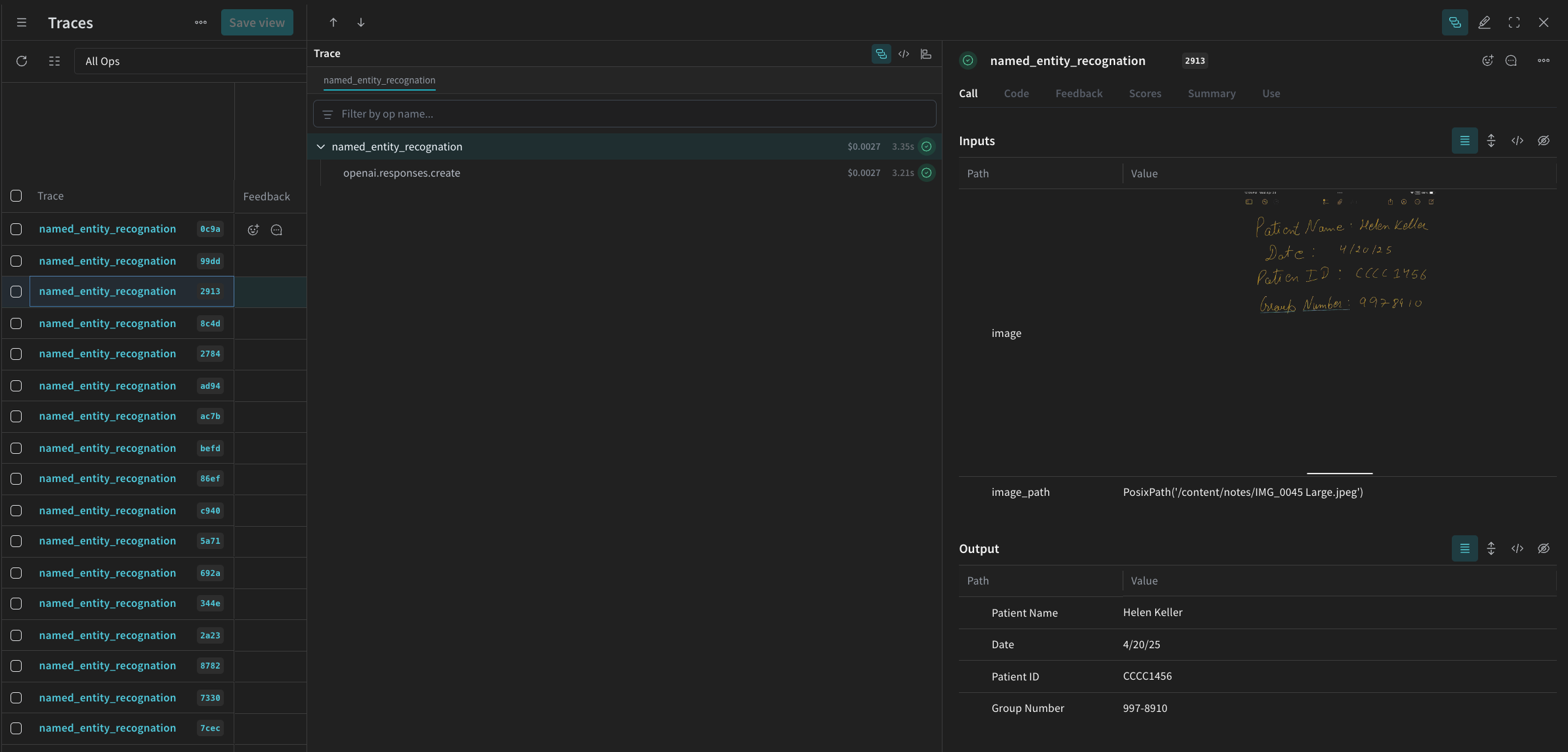
最後に、パイプラインをデータセットに対して実行し、結果を確認します。 次のコードはデータセットをループし、結果をローカルファイル processing_results.json に保存します。結果は Weave の UI 上でも参照できます。
# 出力結果
results = []

# データセット内のすべての画像をループ処理
for row in dataset.rows:
    result = named_entity_recognation(row["image_base64"], str(row["id"]))
    result["image_id"] = str(row["id"])
    results.append(result)

# すべての結果をJSONファイルに保存
output_file = "processing_results.json"
with open(output_file, "w") as f:
    json.dump(results, f, indent=2)

print(f"Results saved to: {output_file}")
Weave UI の Traces テーブルに、次のような内容が表示されます。
Screenshot 2025-05-02 at 12.03.00 PM.png

4. Weave を使ってパイプラインを評価する

VLM を使って NER を実行するパイプラインを作成したので、Weave を使用してそのパイプラインを体系的に評価し、どれだけうまく動作しているかを確認できます。Weave における Evaluations の詳細については、Evaluations Overview を参照してください。 Weave Evaluation の基本的な構成要素が Scorers です。Scorers は AI の出力を評価し、評価メトリクスを返すために使用されます。AI の出力を受け取り、それを解析して、結果を辞書として返します。Scorers は必要に応じて入力データを参照として使用でき、評価から得られる説明や根拠などの追加情報を出力することもできます。 このセクションでは、パイプラインを評価するために 2 つの Scorer を作成します。
  1. プログラムによる Scorer
  2. LLM-as-a-judge Scorer

プログラムによるスコアラー

プログラムによるスコアラー check_for_missing_fields_programatically は、モデル出力(named_entity_recognition 関数の出力)を受け取り、結果の中でどの keys が欠落しているか、または空になっているかを特定します。 このチェックは、モデルがいずれのフィールドも抽出できなかったサンプルを特定するのに有用です。
# スコアラーの実行を追跡するために weave.op() を追加する
@weave.op()
def check_for_missing_fields_programatically(model_output):
    # すべてのエントリに必要なキー
    required_fields = {"Patient Name", "Date", "Patient ID", "Group Number"}

    for key in required_fields:
        if (
            key not in model_output
            or model_output[key] is None
            or str(model_output[key]).strip() == ""
        ):
            return False  # このエントリには欠損または空のフィールドがある

    return True  # すべての必須フィールドが存在し、空でない

LLM-as-a-judge スコアラー

評価の次のステップでは、実際の NER パフォーマンスが正しく反映されるように、画像データとモデルの出力の両方を入力として用います。画像の内容そのものが、モデル出力だけでなく明示的に参照されます。 このステップで使用する Scorer check_for_missing_fields_with_llm は、LLM(具体的には OpenAI の gpt-4o)を用いてスコアリングを行います。eval_prompt の内容で指定されているとおり、check_for_missing_fields_with_llmBoolean 値を出力します。すべてのフィールドが画像内の情報と一致し、かつフォーマットが正しければ、Scorer は true を返します。いずれかのフィールドが欠落している、空である、不正確である、あるいは不一致である場合、結果は false となり、Scorer は問題点を説明するメッセージも返します。
# LLM-as-a-judge のシステムプロンプト

eval_prompt = """
You are an OCR validation system. Your role is to assess whether the structured text extracted from an image accurately reflects the information in that image.
Only validate the structured text and use the image as your source of truth.

Expected input text format:
{"Patient Name": "First Last", "Date": "04/23/25", "Patient ID": "131313JJH", "Group Number": "35453453"}

Evaluation criteria:
- All four fields must be present.
- No field should be empty or contain placeholder/malformed values.
- The "Date" should be in MM/DD/YY format (e.g., "04/07/25") (zero padding the date is allowed)

Scoring:
- Return: {"Correct": true, "Reason": ""} if **all fields** match the information in the image and formatting is correct.
- Return: {"Correct": false, "Reason": "EXPLANATION"} if **any** field is missing, empty, incorrect, or mismatched.

Output requirements:
- Respond with a valid JSON object only.
- "Correct" must be a JSON boolean: true or false (not a string or number).
- "Reason" must be a short, specific string indicating all the problem — e.g., "Patient Name mismatch", "Date not zero-padded", or "Missing Group Number".
- Do not return any additional explanation or formatting.

Your response must be exactly one of the following:
{"Correct": true, "Reason": null}
OR
{"Correct": false, "Reason": "EXPLANATION_HERE"}
"""

# weave.op() を追加して Scorer の実行を追跡する
@weave.op()
def check_for_missing_fields_with_llm(model_output, image_base64):
    client = OpenAI()
    response = client.chat.completions.create(
        model="gpt-4o",
        messages=[
            {"role": "developer", "content": [{"text": eval_prompt, "type": "text"}]},
            {
                "role": "user",
                "content": [
                    {
                        "type": "image_url",
                        "image_url": {
                            "url": image_base64,
                        },
                    },
                    {"type": "text", "text": str(model_output)},
                ],
            },
        ],
        response_format={"type": "json_object"},
    )
    response = json.loads(response.choices[0].message.content)
    return response

5. 評価を実行する

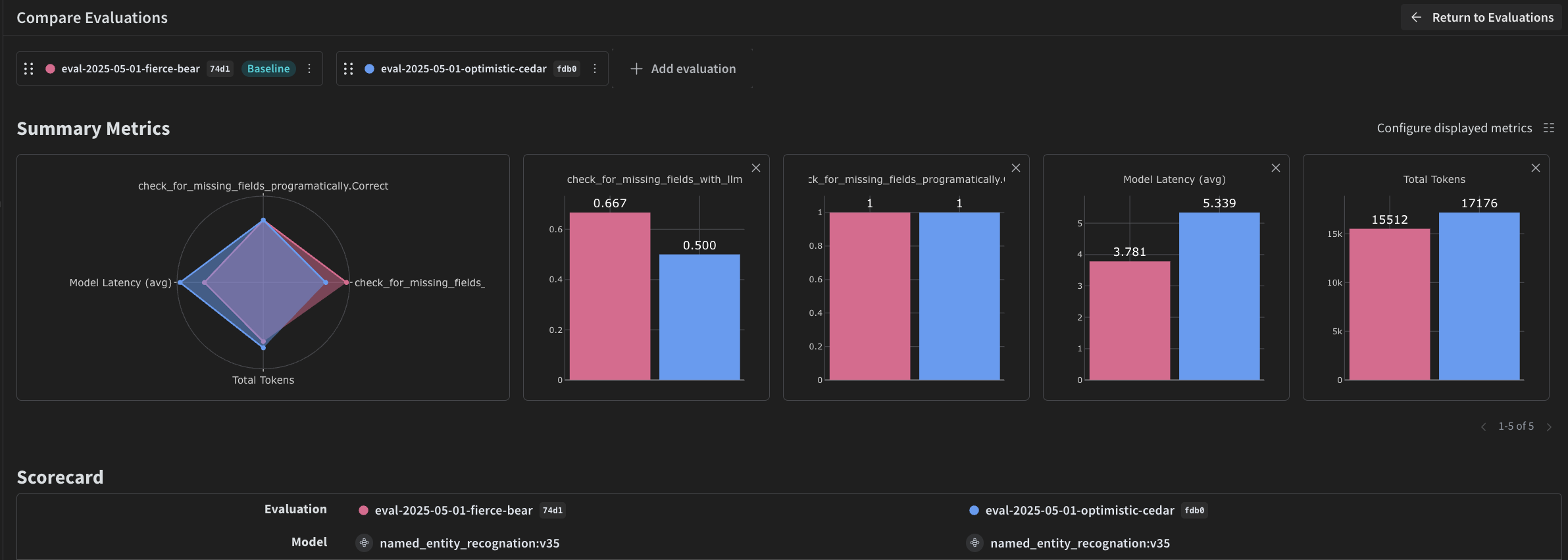
最後に、渡された dataset を自動的に繰り返し処理し、結果を Weave UI にまとめてログする評価用の呼び出しを定義します。 次のコードは評価の実行を開始し、NER パイプラインのすべての出力に 2 つの Scorer を適用します。結果は Weave UI の Evals タブで確認できます。
evaluation = weave.Evaluation(
    dataset=dataset,
    scorers=[
        check_for_missing_fields_with_llm,
        check_for_missing_fields_programatically,
    ],
    name="Evaluate_4.1_NER",
)

print(await evaluation.evaluate(named_entity_recognation))
上記のコードを実行すると、Weave UI の Evaluation テーブルへのリンクが生成されます。リンクを開き、結果を確認して、任意のモデル、プロンプト、データセットに対するパイプラインのさまざまなイテレーションを比較できます。Weave UI は、チーム用に、以下のような可視化を自動的に作成します。
Screenshot 2025-05-02 at 12.26.15 PM.png