メインコンテンツへスキップ
これはインタラクティブなノートブックです。ローカルで実行するか、以下のリンクのいずれかを使用できます:

Not Diamond を用いた LLM プロンプトのカスタムルーティング

このノートブックでは、Weave を Not Diamond のカスタムルーティング と連携させ、評価結果に基づいて LLM プロンプトを最も適切なモデルにルーティングする方法を説明します。

プロンプトのルーティング

複雑な LLM ワークフローを構築する際、ユーザーは精度、コスト、呼び出しレイテンシに応じて異なるモデルにプロンプトを使い分ける必要が出てくる場合があります。 ユーザーは Not Diamond を使用して、これらのワークフロー内のプロンプトをニーズに合った適切なモデルへルーティングし、精度を最大化しつつモデルコストを削減できます。 任意のデータ分布において、あらゆるクエリで他のすべてのモデルよりも優れた性能を発揮する単一のモデルが存在することはほとんどありません。複数のモデルを組み合わせて、どの LLM をいつ呼び出すかを学習する「メタモデル」を構築することで、個々のモデルの性能をすべて上回り、同時にコストとレイテンシを削減することも可能です。

カスタムルーティング

プロンプト用のカスタムルーターを訓練するには、次の3つが必要です。
  1. LLMプロンプトのセット: プロンプトは文字列であり、アプリケーションで実際に使用しているプロンプトを代表する必要があります。
  2. LLMの応答: 各入力に対する候補LLMからの応答です。候補LLMには、サポートされているLLMと、独自のカスタムモデルの両方を含めることができます。
  3. 候補LLMからの入力に対する応答の評価スコア: スコアは数値であり、ニーズに合う任意の指標を使用できます。
これらを Not Diamond API に送信すると、各ワークフローに最適化されたカスタムルーターを訓練できます。

学習データのセットアップ

実運用では、独自の Evaluation を使ってカスタムルーターを学習します。しかしこのサンプルノートブックでは、コーディングタスク向けのカスタムルーターを学習するために、 HumanEval データセット に対する LLM 応答を使用します。 この例のために用意したデータセットをまずダウンロードし、その後、各モデルについて LLM 応答を EvaluationResults にパースしていきます。
!curl -L "https://drive.google.com/uc?export=download&id=1q1zNZHioy9B7M-WRjsJPkfvFosfaHX38" -o humaneval.csv
python
import random

import weave
from weave.flow.dataset import Dataset
from weave.flow.eval import EvaluationResults
from weave.integrations.notdiamond.util import get_model_evals

pct_train = 0.8
pct_test = 1 - pct_train

# 実際には、データセットに対してEvaluationを構築し、
# `evaluation.get_eval_results(model)` を呼び出してください
model_evals = get_model_evals("./humaneval.csv")
model_train = {}
model_test = {}
for model, evaluation_results in model_evals.items():
    n_results = len(evaluation_results.rows)
    all_idxs = list(range(n_results))
    train_idxs = random.sample(all_idxs, k=int(n_results * pct_train))
    test_idxs = [idx for idx in all_idxs if idx not in train_idxs]

    model_train[model] = EvaluationResults(
        rows=weave.Table([evaluation_results.rows[idx] for idx in train_idxs])
    )
    model_test[model] = Dataset(
        rows=weave.Table([evaluation_results.rows[idx] for idx in test_idxs])
    )
    print(
        f"Found {len(train_idxs)} train rows and {len(test_idxs)} test rows for {model}."
    )

カスタムルーターの学習

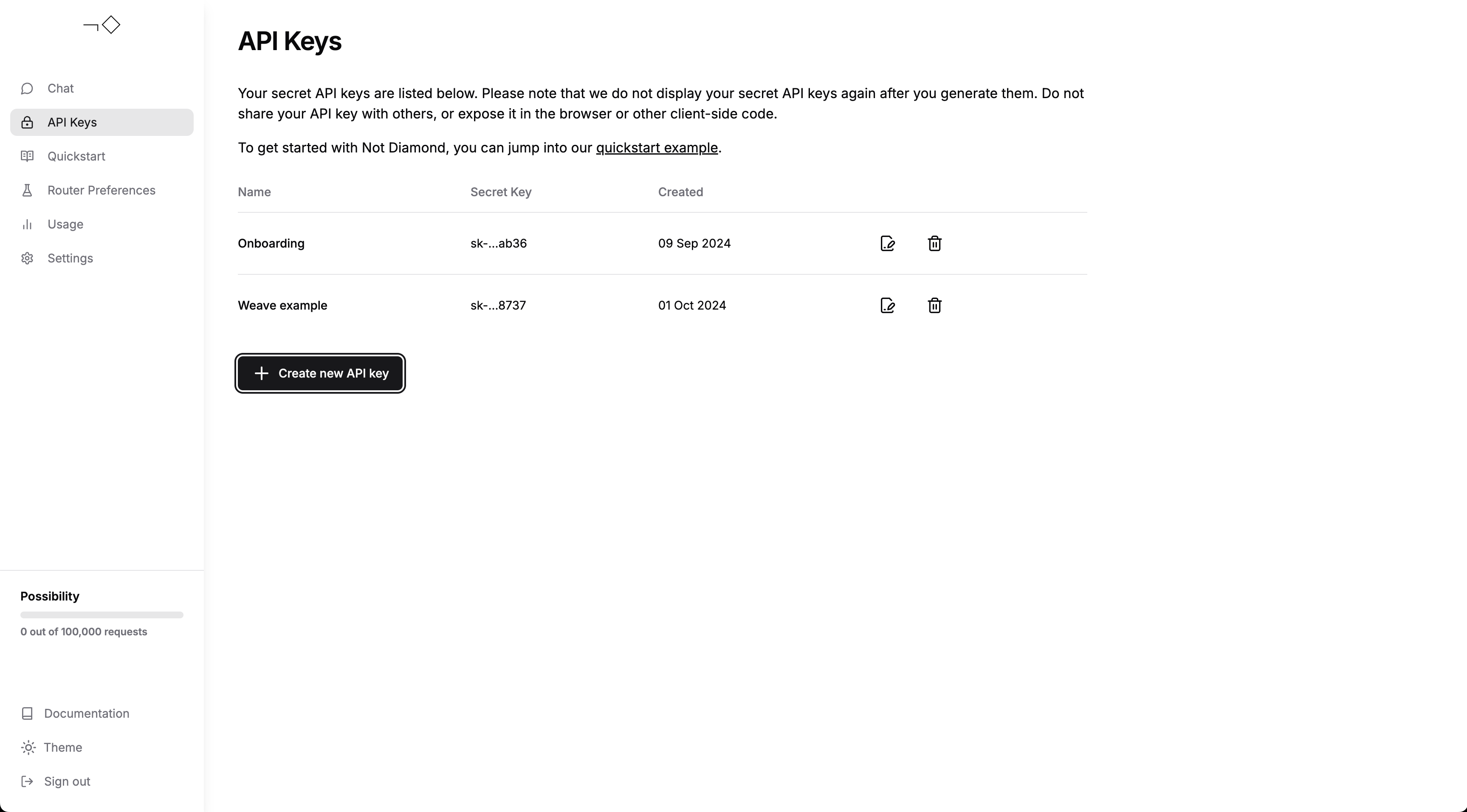
EvaluationResults が揃ったので、カスタムルーターを学習できます。アカウントを作成し、 APIキーを生成したうえで、以下にそのAPIキーを入力してください。
Create an API key
import os

from weave.integrations.notdiamond.custom_router import train_router

api_key = os.getenv("NOTDIAMOND_API_KEY", "<YOUR_API_KEY>")

preference_id = train_router(
    model_evals=model_train,
    prompt_column="prompt",
    response_column="actual",
    language="en",
    maximize=True,
    api_key=api_key,
    # 初めてカスタムルーターをトレーニングする場合はこのままにしてください
    # カスタムルーターを再トレーニングする場合はコメントを解除してください
    # preference_id=preference_id,
)
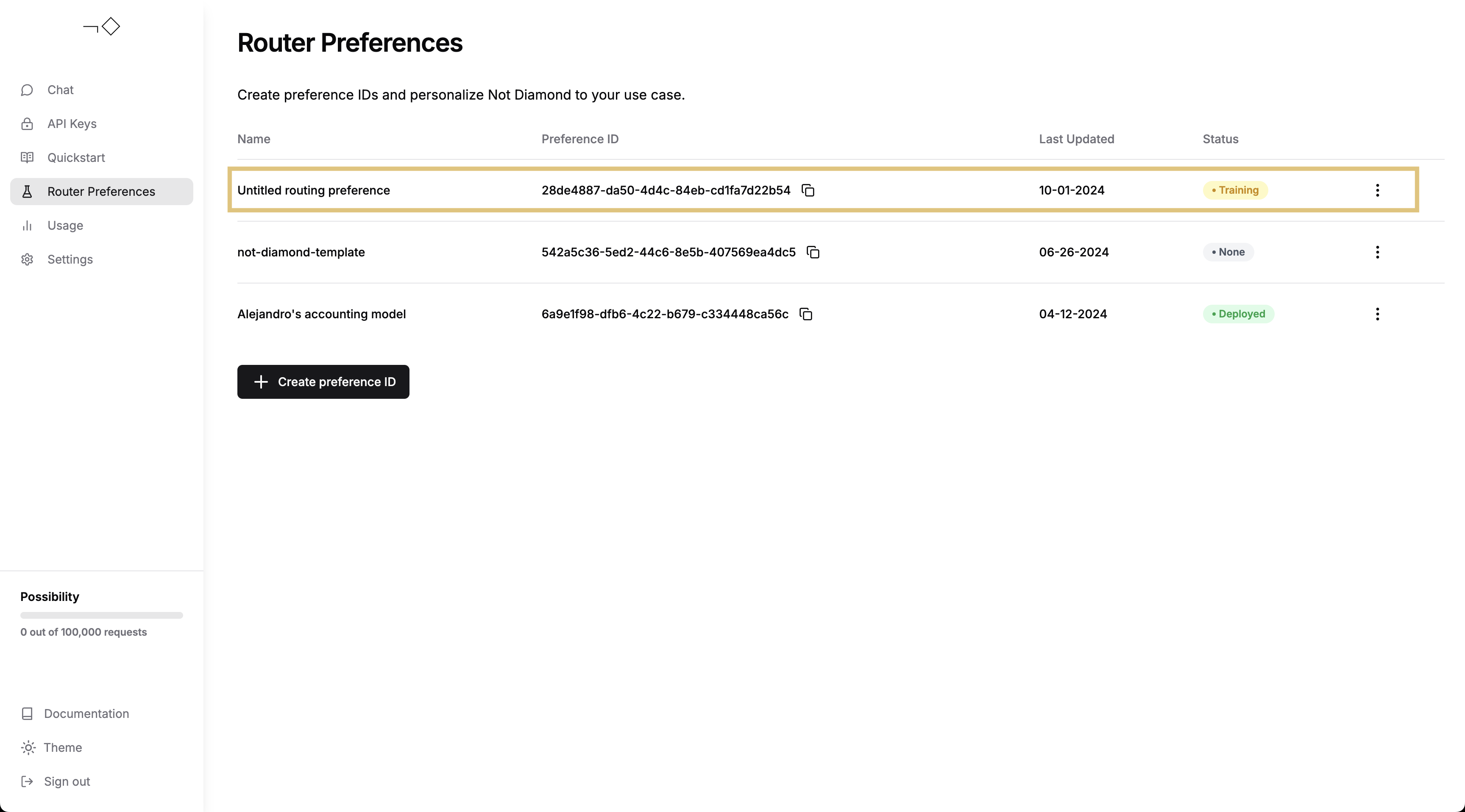
その後、Not Diamond アプリからカスタムルーターの学習プロセスを追跡できます。
Check on router training progress
カスタムルーターの学習が完了したら、そのルーターを使ってプロンプトをルーティングできます。
from notdiamond import NotDiamond

import weave

weave.init("notdiamond-quickstart")

llm_configs = [
    "anthropic/claude-3-5-sonnet-20240620",
    "openai/gpt-4o-2024-05-13",
    "google/gemini-1.5-pro-latest",
    "openai/gpt-4-turbo-2024-04-09",
    "anthropic/claude-3-opus-20240229",
]
client = NotDiamond(api_key=api_key, llm_configs=llm_configs)

new_prompt = (
    """
You are a helpful coding assistant. Using the provided function signature, write the implementation for the function
in Python. Write only the function. Do not include any other text.

from typing import List

def has_close_elements(numbers: List[float], threshold: float) -> bool:
    """
    """ Check if in given list of numbers, are any two numbers closer to each other than
    given threshold.
    >>> has_close_elements([1.0, 2.0, 3.0], 0.5)
    False
    >>> has_close_elements([1.0, 2.8, 3.0, 4.0, 5.0, 2.0], 0.3)
    True
    """
    """
"""
)
session_id, routing_target_model = client.model_select(
    messages=[{"role": "user", "content": new_prompt}],
    preference_id=preference_id,
)

print(f"Session ID: {session_id}")
print(f"Target Model: {routing_target_model}")
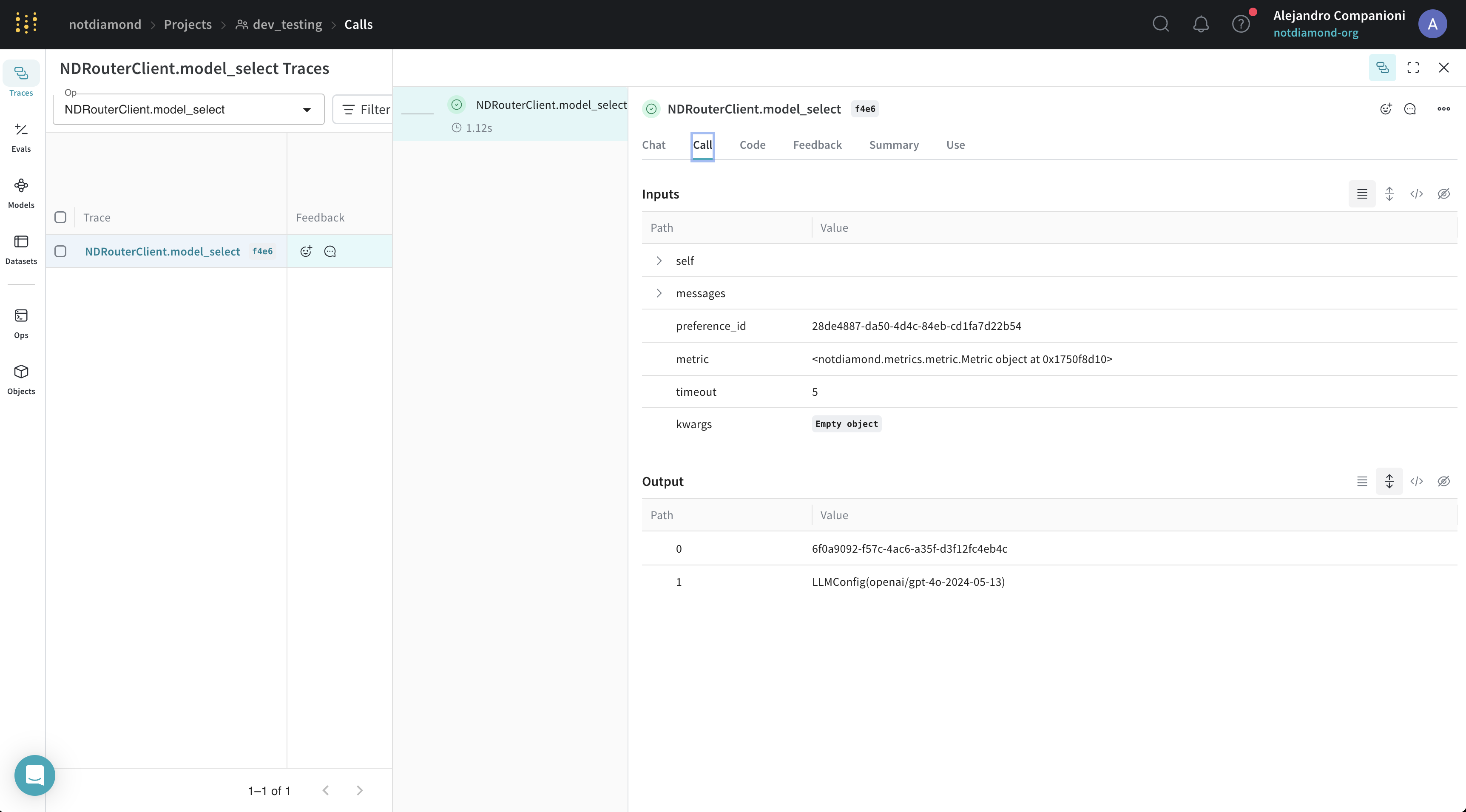
この例では、Not Diamond の Weave 自動トレース対応も利用しています。結果は Weave UI で確認できます。 Weave UI for custom routing

カスタムルーターの評価

カスタムルーターを学習させたら、次のいずれかの方法で評価できます。
  • 学習プロンプトを送信してインサンプルでの性能を評価する
  • 新規またはホールドアウトしたプロンプトを送信してアウトオブサンプルでの性能を評価する
以下では、テストセットをカスタムルーターに送信して、その性能を評価します。
from weave.integrations.notdiamond.custom_router import evaluate_router

eval_prompt_column = "prompt"
eval_response_column = "actual"

best_provider_model, nd_model = evaluate_router(
    model_datasets=model_test,
    prompt_column=eval_prompt_column,
    response_column=eval_response_column,
    api_key=api_key,
    preference_id=preference_id,
)
python
@weave.op()
def is_correct(score: int, output: dict) -> dict:
    # すでにモデルのレスポンスがあるため、スコアを直接設定する
    return {"correct": score}

best_provider_eval = weave.Evaluation(
    dataset=best_provider_model.model_results.to_dict(orient="records"),
    scorers=[is_correct],
)
await best_provider_eval.evaluate(best_provider_model)

nd_eval = weave.Evaluation(
    dataset=nd_model.model_results.to_dict(orient="records"), scorers=[is_correct]
)
await nd_eval.evaluate(nd_model)
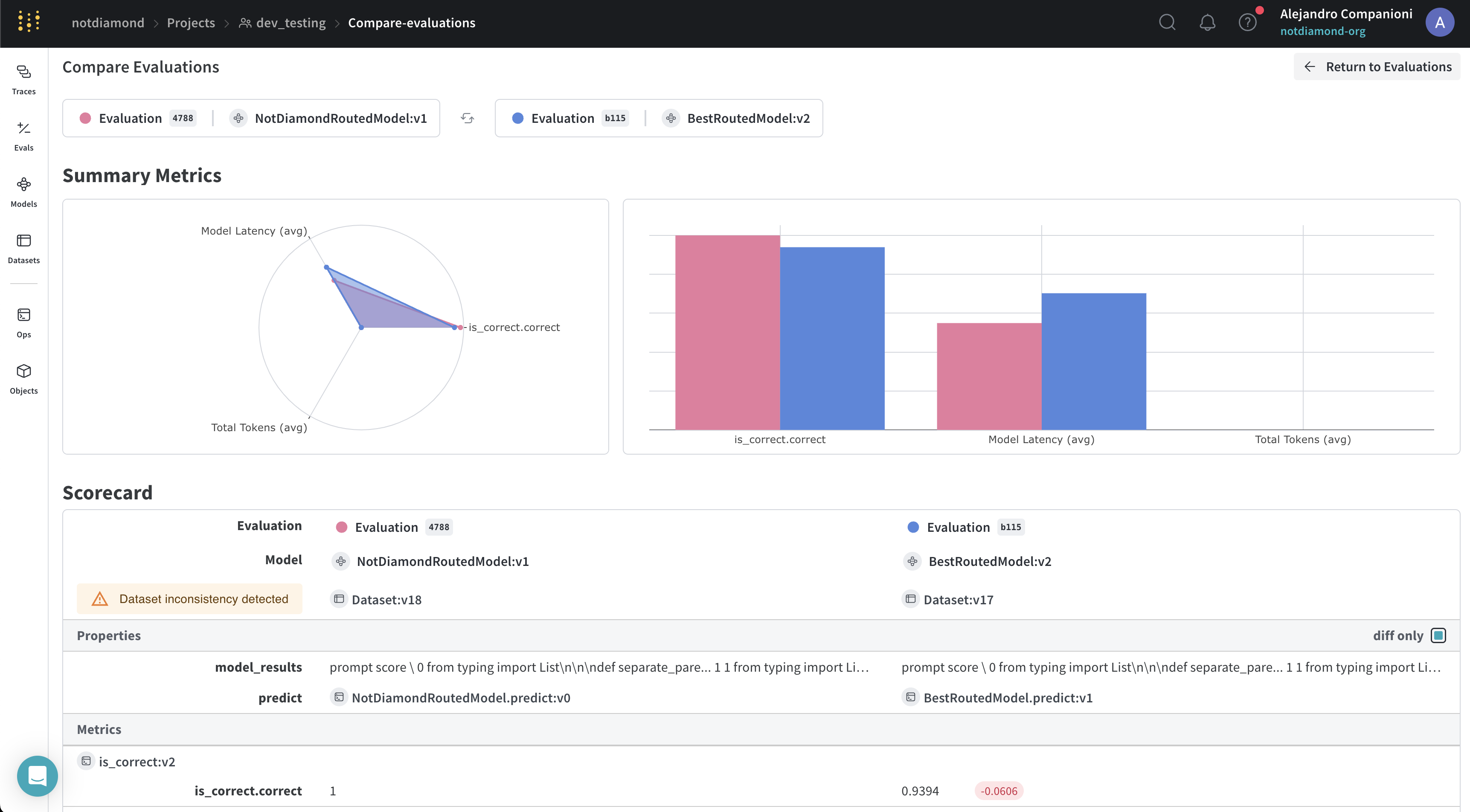
この例では、Not Diamond の「メタモデル」が、複数のモデル間でプロンプトを振り分けます。 Weave を使ってカスタムルーターを学習すると、その際に評価も実行され、結果が Weave UI にアップロードされます。カスタムルーターの処理が完了したら、Weave UI で結果を確認できます。 UI では、Not Diamond の「メタモデル」が、プロンプトに正確に回答できる可能性がより高い他のモデルにプロンプトをルーティングすることで、最も性能の高いモデルを上回っていることがわかります。
Evaluating Not Diamond