메인 콘텐츠로 건너뛰기
Weave는 weave.init()이 호출된 이후부터 ChatNVIDIA 라이브러리를 통해 수행된 LLM 호출을 자동으로 추적하고 로깅합니다.
최신 튜토리얼은 Weights & Biases on NVIDIA에서 확인하세요.

트레이싱

LLM 애플리케이션의 트레이스를 개발 중과 프로덕션 환경 모두에서 중앙 데이터베이스에 저장하는 것은 중요합니다. 이러한 트레이스는 디버깅에 활용하고, 애플리케이션을 개선하는 과정에서 평가용 까다로운 예제들로 구성된 데이터셋을 구축하는 데 사용합니다.
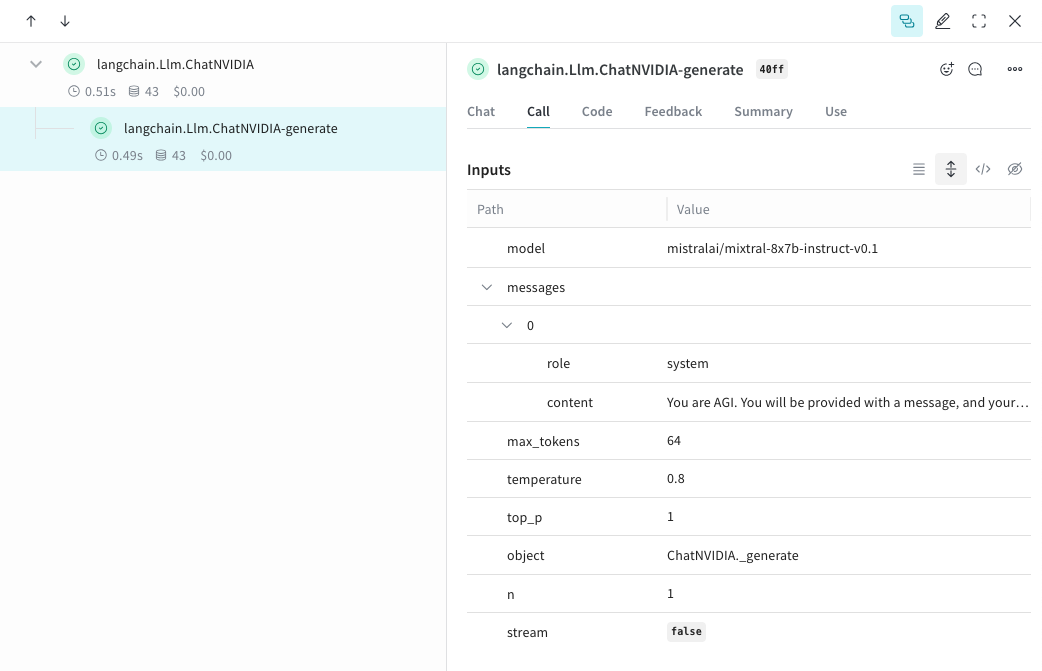
Weave는 ChatNVIDIA Python 라이브러리의 트레이스를 자동으로 수집할 수 있습니다.원하는 프로젝트 이름을 넣어 weave.init(<project-name>)를 호출해 캡처를 시작합니다.
from langchain_nvidia_ai_endpoints import ChatNVIDIA
import weave
client = ChatNVIDIA(model="mistralai/mixtral-8x7b-instruct-v0.1", temperature=0.8, max_tokens=64, top_p=1)
weave.init('emoji-bot')

messages=[
    {
      "role": "system",
      "content": "You are AGI. You will be provided with a message, and your task is to respond using emojis only."
    }]

response = client.invoke(messages)
chatnvidia_trace.png

나만의 op 추적하기

@weave.op으로 함수를 래핑하면 입력, 출력, 앱 로직을 모두 캡처하기 시작하므로, 데이터가 앱을 통해 어떻게 흐르는지 디버깅할 수 있습니다. op를 깊게 중첩해서 추적하고 싶은 함수들의 트리를 만들 수 있습니다. 또한 실험하는 동안 git에 커밋되지 않은 즉흥적인 변경 사항까지 캡처할 수 있도록 코드를 자동으로 버전 관리하기 시작합니다.ChatNVIDIA Python 라이브러리를 호출하는 @weave.op 데코레이터가 적용된 함수를 하나 만들면 됩니다.아래 예시에서는 op로 래핑된 함수가 2개 있습니다. 이를 통해 RAG 앱의 검색 단계 같은 중간 단계가 앱 동작에 어떤 영향을 주는지 확인할 수 있습니다.
import weave
from langchain_nvidia_ai_endpoints import ChatNVIDIA
import requests, random
PROMPT="""Emulate the Pokedex from early Pokémon episodes. State the name of the Pokemon and then describe it.
        Your tone is informative yet sassy, blending factual details with a touch of dry humor. Be concise, no more than 3 sentences. """
POKEMON = ['pikachu', 'charmander', 'squirtle', 'bulbasaur', 'jigglypuff', 'meowth', 'eevee']
client = ChatNVIDIA(model="mistralai/mixtral-8x7b-instruct-v0.1", temperature=0.7, max_tokens=100, top_p=1)

@weave.op
def get_pokemon_data(pokemon_name):
    # 이것은 RAG 앱의 검색 단계처럼, 애플리케이션 내의 한 단계입니다
    url = f"https://pokeapi.co/api/v2/pokemon/{pokemon_name}"
    response = requests.get(url)
    if response.status_code == 200:
        data = response.json()
        name = data["name"]
        types = [t["type"]["name"] for t in data["types"]]
        species_url = data["species"]["url"]
        species_response = requests.get(species_url)
        evolved_from = "Unknown"
        if species_response.status_code == 200:
            species_data = species_response.json()
            if species_data["evolves_from_species"]:
                evolved_from = species_data["evolves_from_species"]["name"]
        return {"name": name, "types": types, "evolved_from": evolved_from}
    else:
        return None

@weave.op
def pokedex(name: str, prompt: str) -> str:
    # 이것은 다른 op들을 호출하는 루트 op입니다
    data = get_pokemon_data(name)
    if not data: return "Error: Unable to fetch data"

    messages=[
            {"role": "system","content": prompt},
            {"role": "user", "content": str(data)}
        ]

    response = client.invoke(messages)
    return response.content

weave.init('pokedex-nvidia')
# 특정 포켓몬에 대한 데이터를 가져옵니다
pokemon_data = pokedex(random.choice(POKEMON), PROMPT)
Weave로 이동해서 UI에서 get_pokemon_data를 클릭하면 해당 단계의 입력과 출력을 확인할 수 있습니다.
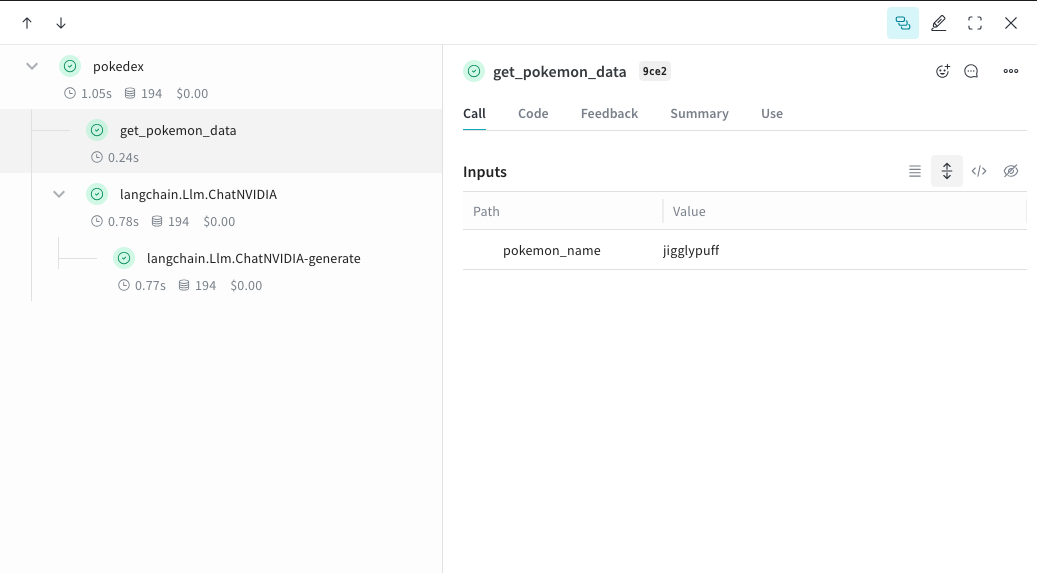
nvidia_pokedex.png

더 쉬운 실험을 위한 Model 생성

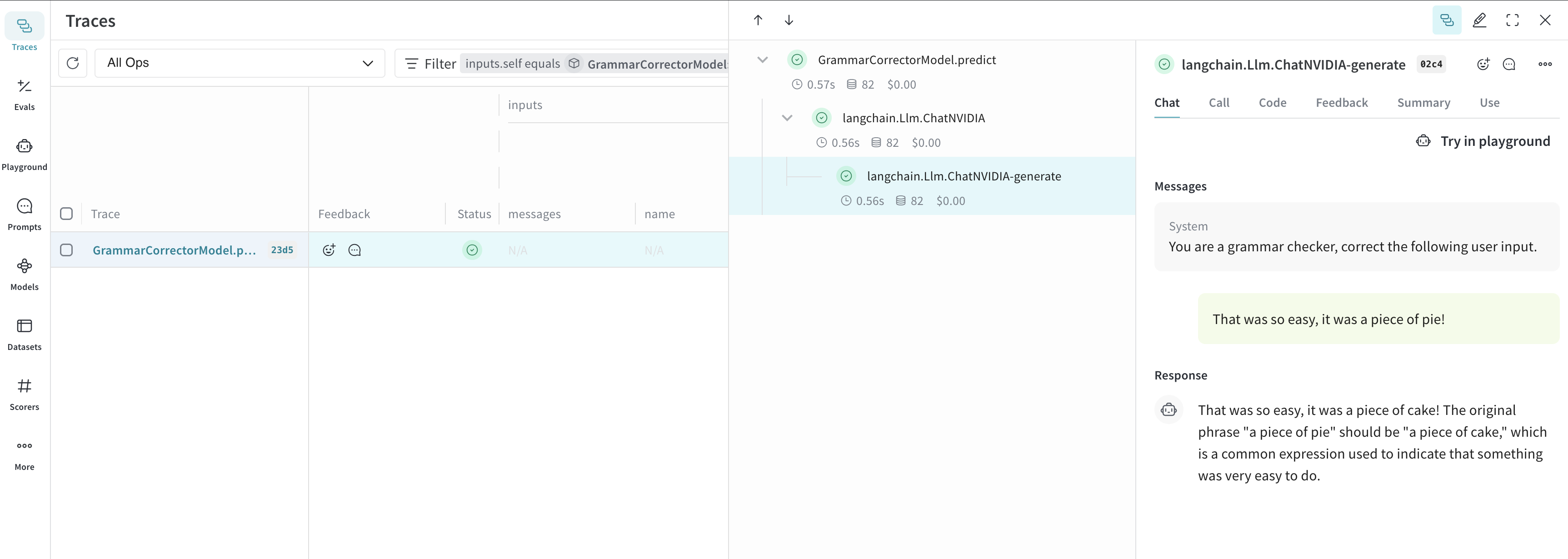
많은 요소가 얽혀 있을 때 실험을 체계적으로 구성하기는 어렵습니다. Model 클래스를 사용하면 시스템 프롬프트나 사용 중인 모델처럼 앱의 실험 관련 세부 정보를 캡처하고 정리할 수 있습니다. 이를 통해 앱의 다양한 반복 버전을 체계적으로 관리하고 서로 비교할 수 있습니다.코드 버전 관리와 입력/출력 캡처에 더해, Model은 애플리케이션 동작을 제어하는 구조화된 파라미터를 캡처하여 어떤 파라미터 조합이 가장 잘 동작했는지 쉽게 찾을 수 있게 해 줍니다. 또한 Weave Models를 serveEvaluation과 함께 사용할 수도 있습니다.아래 예제에서는 modelsystem_message를 바꿔가며 실험할 수 있습니다. 이들 중 하나를 변경할 때마다 GrammarCorrectorModel의 새로운 _버전_이 생성됩니다.
import weave
from langchain_nvidia_ai_endpoints import ChatNVIDIA

weave.init('grammar-nvidia')

class GrammarCorrectorModel(weave.Model): # `weave.Model`로 변경
  system_message: str

  @weave.op()
  def predict(self, user_input): # `predict`로 변경
    client = ChatNVIDIA(model="mistralai/mixtral-8x7b-instruct-v0.1", temperature=0, max_tokens=100, top_p=1)

    messages=[
          {
              "role": "system",
              "content": self.system_message
          },
          {
              "role": "user",
              "content": user_input
          }
          ]

    response = client.invoke(messages)
    return response.content

corrector = GrammarCorrectorModel(
    system_message = "You are a grammar checker, correct the following user input.")
result = corrector.predict("That was so easy, it was a piece of pie!")
print(result)
chatnvidia_model.png

사용 정보

ChatNVIDIA 인테그레이션은 invoke, stream 및 각각의 비동기 버전을 지원합니다. 또한 도구 사용도 지원합니다. ChatNVIDIA는 다양한 유형의 모델과 함께 사용하도록 설계되었기 때문에, 함수 호출은 지원하지 않습니다.