메인 콘텐츠로 건너뛰기
Colab에서 열기 Weave는 MistralAI Python library를 통해 수행되는 LLM 호출을 자동으로 추적하고 로깅합니다.
새로운 Mistral v1.0 SDK를 지원합니다. 마이그레이션 가이드는 여기에서 확인하세요.

트레이스

LLM 애플리케이션의 트레이스를 개발 단계와 프로덕션 환경 모두에서 중앙 데이터베이스에 저장하는 것은 중요합니다. 이렇게 저장한 트레이스는 디버깅에 사용하고, 애플리케이션을 개선하는 데 도움이 되는 데이터셋으로 활용할 수 있습니다. Weave는 mistralai에 대한 트레이스를 자동으로 캡처합니다. 라이브러리는 평소처럼 사용하면 되며, 먼저 weave.init()을 호출하면 됩니다:
import weave
weave.init("cheese_recommender")

# 그런 다음 mistralai 라이브러리를 평소와 같이 사용합니다
import os
from mistralai import Mistral

api_key = os.environ["MISTRAL_API_KEY"]
model = "mistral-large-latest"

client = Mistral(api_key=api_key)

messages = [
    {
        "role": "user",
        "content": "What is the best French cheese?",
    },
]

chat_response = client.chat.complete(
    model=model,
    messages=messages,
)
이제 Weave는 MistralAI 라이브러리를 통해 수행되는 모든 LLM 호출을 추적하고 로그로 기록합니다. Weave 웹 인터페이스에서 해당 트레이스를 확인할 수 있습니다. mistral_trace.png

직접 정의한 ops로 감싸기

Weave ops는 실험하는 동안 코드를 자동으로 버저닝하고 입력과 출력을 캡처하여 결과를 재현 가능하게 만듭니다. @weave.op() 데코레이터를 적용한 함수를 하나 만들고 그 안에서 mistralai.client.MistralClient.chat()을 호출하기만 하면, Weave가 해당 입력과 출력을 자동으로 추적합니다. 이제 이 방식을 우리 치즈 추천기(cheese recommender)에 어떻게 적용할 수 있는지 살펴보겠습니다:
@weave.op()
def cheese_recommender(region:str, model:str) -> str:
    "Recommend the best cheese in a given region"
    
    messages = [
        {
            "role": "user",
            "content": f"What is the best cheese in {region}?",
        },
    ]

    chat_response = client.chat.complete(
        model=model,
        messages=messages,
    )
    return chat_response.choices[0].message.content

cheese_recommender(region="France", model="mistral-large-latest")
cheese_recommender(region="Spain", model="mistral-large-latest")
cheese_recommender(region="Netherlands", model="mistral-large-latest")
mistral_ops.png

더 쉬운 실험을 위해 Model 만들기

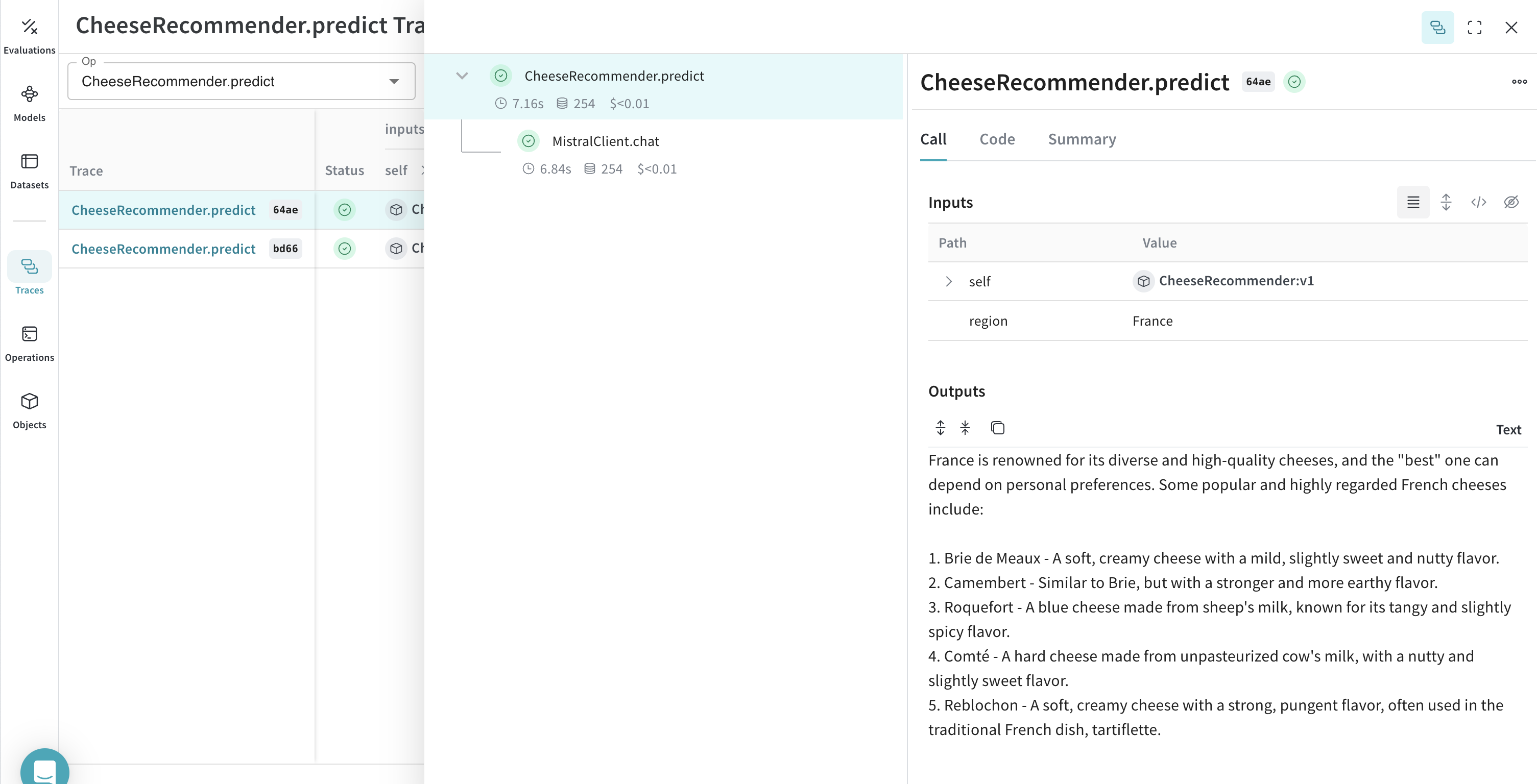
실험을 체계적으로 관리하는 일은 구성 요소가 많을수록 어려워집니다. Model 클래스를 사용하면 시스템 프롬프트나 사용 중인 모델처럼 앱의 실험 관련 세부 정보를 캡처하고 정리할 수 있습니다. 이렇게 하면 앱의 다양한 반복 버전을 정리하고 비교하기가 더 쉬워집니다. 코드 버저닝과 입력/출력 캡처 외에도 Model은 애플리케이션 동작을 제어하는 구조화된 파라미터를 캡처하므로, 어떤 파라미터가 가장 잘 작동했는지 쉽게 찾을 수 있습니다. 또한 Weave Models를 serveEvaluation과 함께 사용할 수 있습니다. 아래 예시에서는 modelcountry를 변경하며 실험할 수 있습니다. 둘 중 하나를 변경할 때마다 CheeseRecommender의 새로운 버전이 생성됩니다.
import weave
from mistralai import Mistral

weave.init("mistralai_project")

class CheeseRecommender(weave.Model): # `weave.Model`로 변경
    model: str
    temperature: float

    @weave.op()
    def predict(self, region:str) -> str: # `predict`로 변경
        "주어진 지역에서 최고의 치즈를 추천합니다"
        
        client = Mistral(api_key=api_key)

        messages = [
            {
                "role": "user",
                "content": f"What is the best cheese in {region}?",
            },
        ]

        chat_response = client.chat.complete(
            model=model,
            messages=messages,
            temperature=self.temperature
        )
        return chat_response.choices[0].message.content

cheese_model = CheeseRecommender(
    model="mistral-medium-latest",
    temperature=0.0
    )
result = cheese_model.predict(region="France")
print(result)
mistral_model.png